

This tutorial demonstrates how to generate sample trajectories (simulated paths) using StatsForecast.
Prerequisites This tutorial assumes basic familiarity with StatsForecast. For a minimal example visit the Quick Start
Introduction
While standard forecasting methods often produce a single point forecast or prediction intervals, some scenarios require understanding the full range of possible future paths. Trajectory simulation allows you to generate multiple possible future realizations of a time series based on the fitted model’s error distribution. This is particularly useful for: - Risk analysis and stress testing. - Scenario planning (e.g., “what if” analyses). - Calculating complex metrics based on future paths (e.g., probability of breach). By the end of this tutorial, you’ll be able to use thesimulate method
in StatsForecast to generate and visualize these paths using various
error distributions.
Important Trajectory simulation is currently supported forOutline:AutoARIMAand other statistical models that implement thesimulateinterface.
- Install libraries
- Load and explore the data
- Basic simulation (Normal Distribution)
- Automatic parameter inference
- User-provided parameters
- Comparing distributions
- Handling large simulations
Tip You can use Colab to run this Notebook interactively
Install libraries
We assume that you have StatsForecast already installed. If not, check this guide for instructions on how to install StatsForecastLoad and explore the data
We’ll use a subset of the hourly dataset from the M4 Competition.Basic Simulation (Normal Distribution)
A simulation is performed by calling thesimulate method after
fitting. By default, it samples from a Normal distribution using the
model’s estimated variance from the residuals.
The output contains a
sample_id column to distinguish between
different trajectories.
Automatic Parameter Inference
StatsForecast can automatically infer distribution parameters from your model’s residuals. When you don’t specifyerror_params, the system
uses Maximum Likelihood Estimation (MLE) to fit the distribution
parameters to the residuals.
This is particularly useful when you want the simulation to reflect the
actual characteristics of your data’s errors.
Supported Distributions
- ‘normal’: Standard normal distribution (default)
- ‘t’: Student’s t-distribution (heavy tails, good for financial data)
- ‘bootstrap’: Resample from empirical residuals (non-parametric)
- ‘laplace’: Laplace distribution (sharper peak, heavier tails)
- ‘skew-normal’: Skewed normal distribution (for asymmetric errors)
- ‘ged’: Generalized Error Distribution (flexible shape)
User-Provided Parameters
Instead of relying on automatic inference, you can explicitly specify distribution parameters using theerror_params dictionary. This gives
you precise control over the simulation characteristics.
This is useful when: - You have domain knowledge about the error
distribution - You want to stress-test with extreme scenarios - You want
to ensure consistency across different datasets
Parameter Specifications
- ‘t’:
{'df': degrees_of_freedom}- Controls tail heaviness (lower = heavier tails) - ‘skew-normal’:
{'skewness': alpha}- Controls asymmetry (negative = left skew, positive = right skew) - ‘ged’:
{'shape': beta}- Controls tail behavior (1 = Laplace, 2 = Normal, higher = lighter tails)
Comparing Distributions
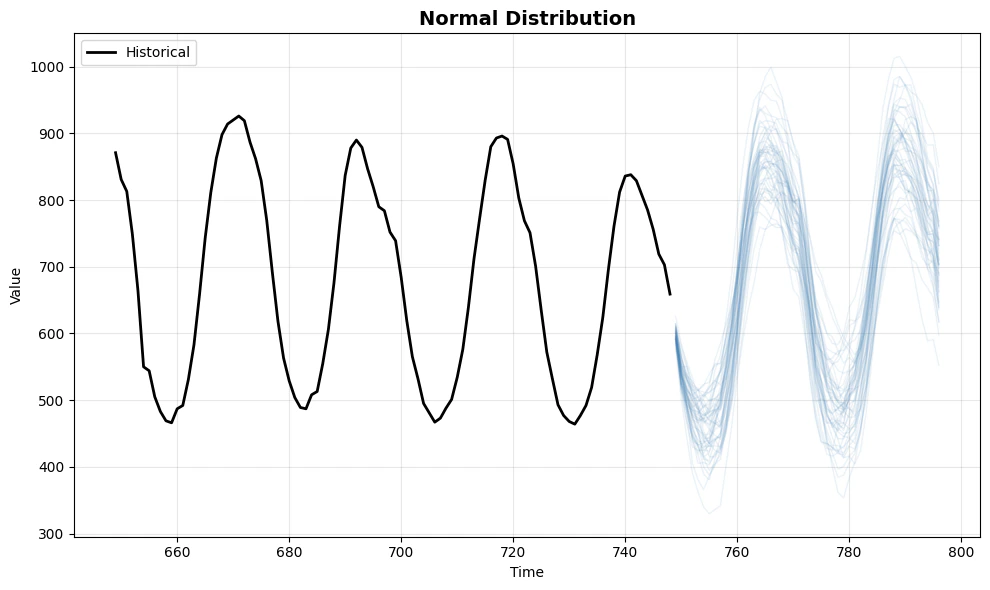
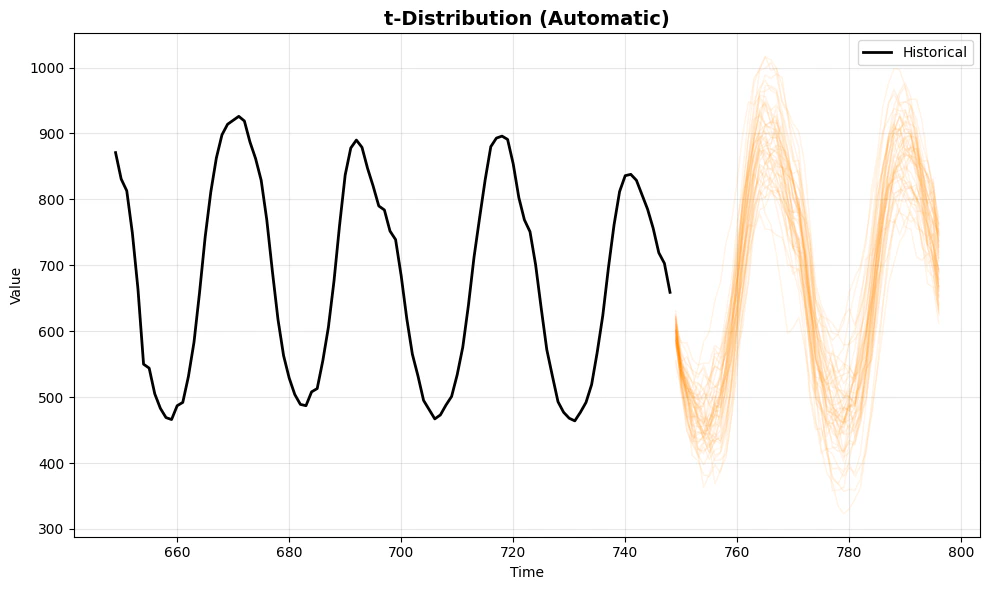
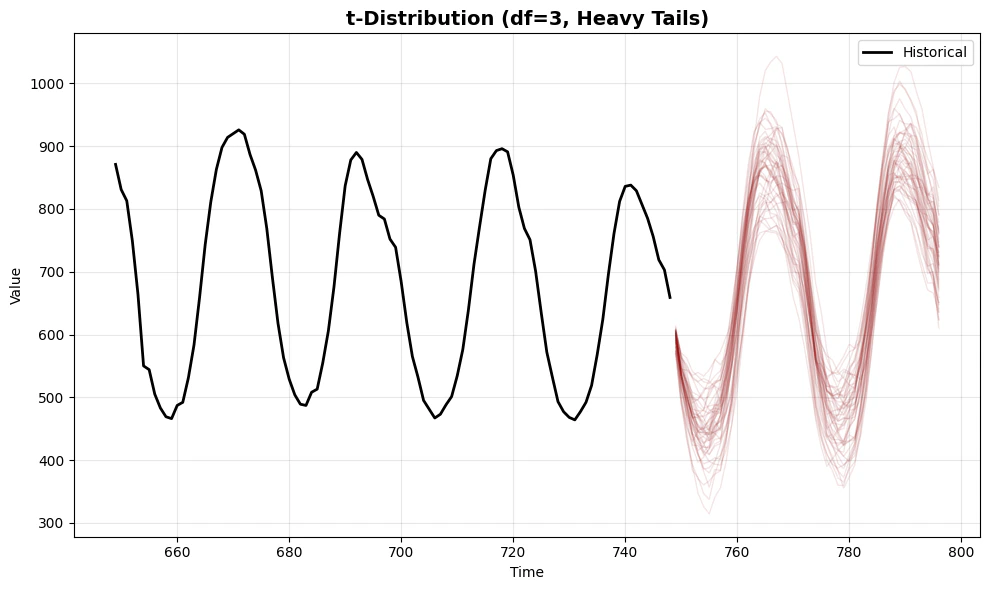
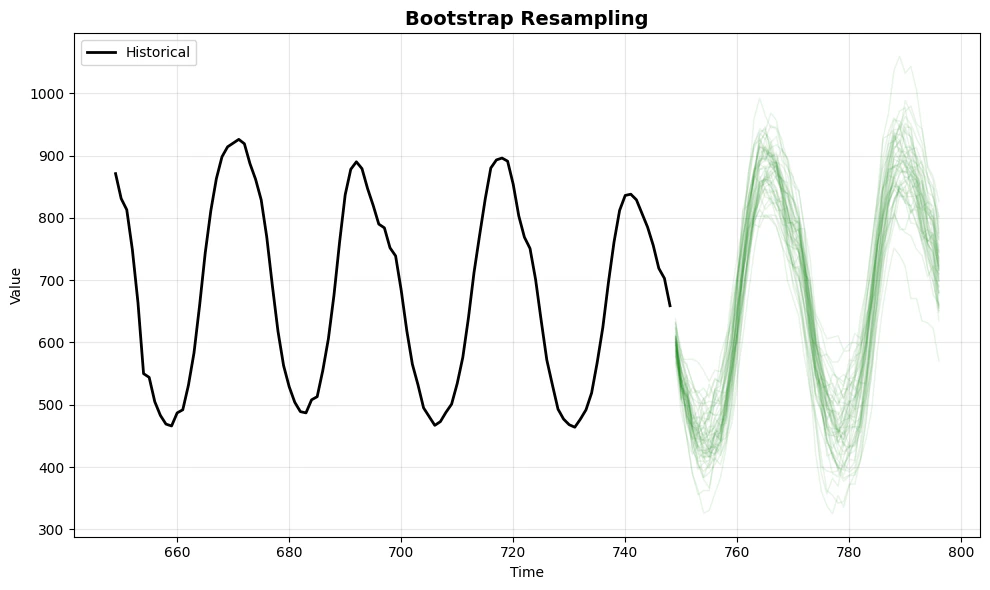
Let’s visualize the differences between automatic inference and user-provided parameters. We’ll compare:- Normal - The baseline distribution
- t-distribution (automatic) - Parameters estimated from residuals
- t-distribution (df=3) - User-specified heavy tails for stress testing
- Bootstrap - Non-parametric resampling from actual residuals
Key Observations
- Normal distribution provides symmetric paths around the mean - suitable when errors are well-behaved
- t-distribution (automatic) adapts to the data’s error characteristics, producing paths that reflect the actual residual distribution
- t-distribution (df=3) with user-specified parameters creates more extreme scenarios, useful for stress testing and risk analysis
- Bootstrap uses the empirical error distribution directly, making no parametric assumptions