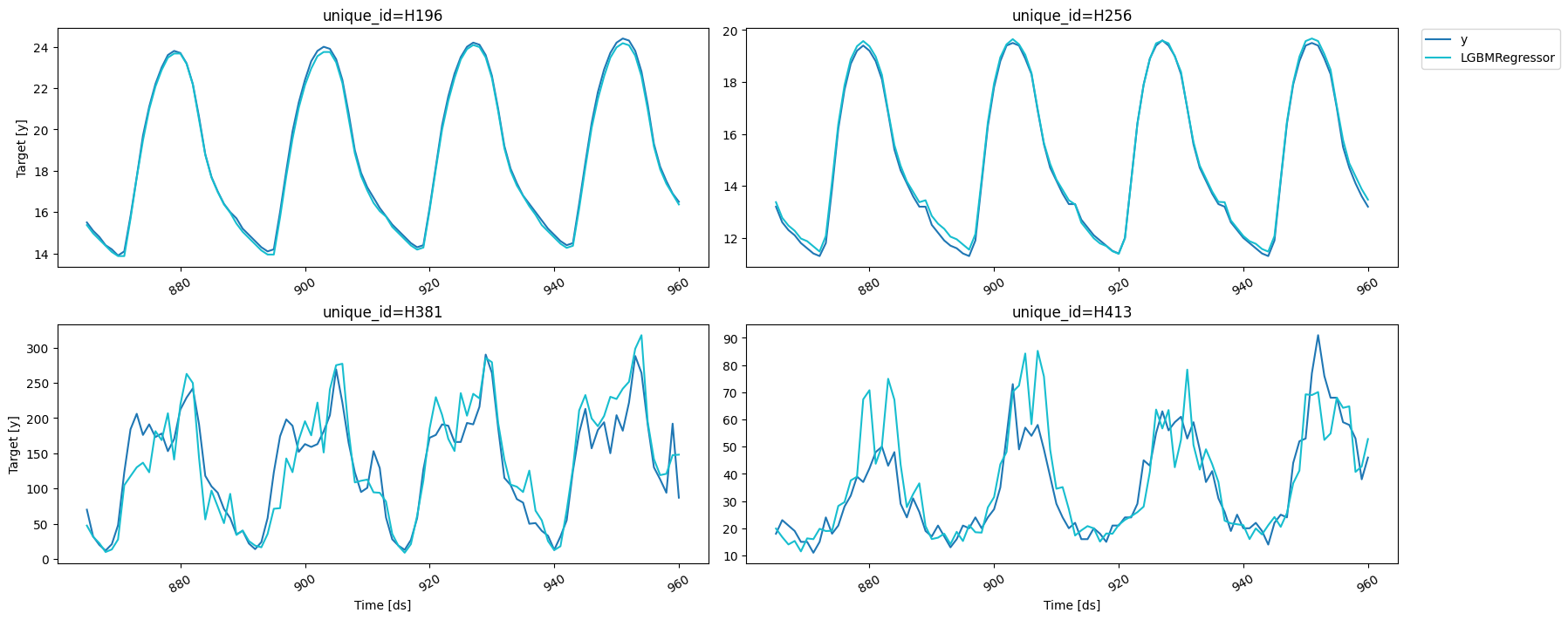
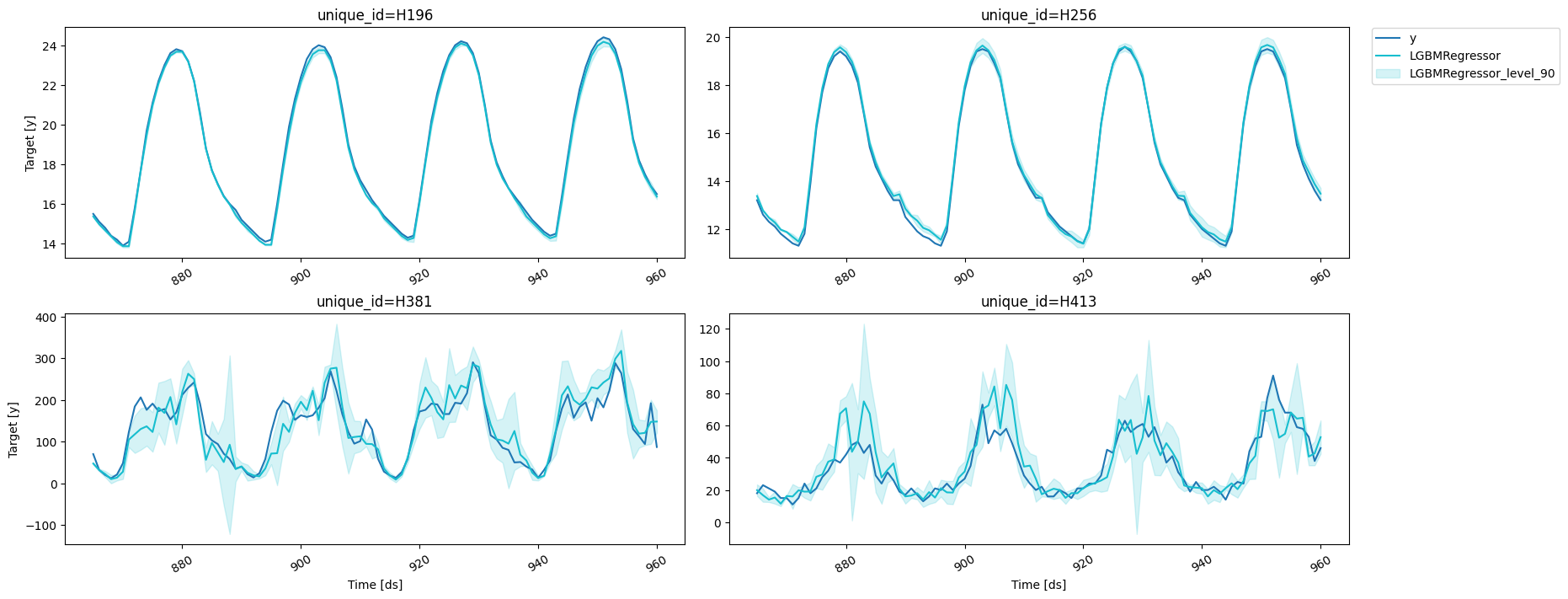
This shows an example with just 4 series of the M4 dataset. If you want to run it yourself on all of them, you can refer to this notebook.
import random

import lightgbm as lgb
import numpy as np
import pandas as pd
from sklearn.linear_model import LinearRegression
from utilsforecast.plotting import plot_series

from mlforecast import MLForecast
from mlforecast.lag_transforms import (
    ExponentiallyWeightedMean,
    RollingMean,
)
from mlforecast.lgb_cv import LightGBMCV
from mlforecast.target_transforms import Differences
from mlforecast.utils import PredictionIntervals
df = pd.read_parquet('https://datasets-nixtla.s3.amazonaws.com/m4-hourly.parquet')
ids = df['unique_id'].unique()
random.seed(0)
sample_ids = random.choices(ids, k=4)
sample_df = df[df['unique_id'].isin(sample_ids)]
sample_df
unique_iddsy
86796H196111.8
86797H196211.4
86798H196311.1
86799H196410.8
86800H196510.6
325235H413100499.0
325236H413100588.0
325237H413100647.0
325238H413100741.0
325239H413100834.0
We now split this data into train and validation.
horizon = 48
valid = sample_df.groupby('unique_id').tail(horizon)
train = sample_df.drop(valid.index)
train.shape, valid.shape
((3840, 3), (192, 3))

Creating the forecaster

fcst = MLForecast(
    models=lgb.LGBMRegressor(random_state=0, verbosity=-1),
    freq=1,
    lags=[24 * (i+1) for i in range(7)],
    lag_transforms={
        48: [ExponentiallyWeightedMean(alpha=0.3)],
    },
    num_threads=1,
    target_transforms=[Differences([24])],
)
fcst
MLForecast(models=[LGBMRegressor], freq=1, lag_features=['lag24', 'lag48', 'lag72', 'lag96', 'lag120', 'lag144', 'lag168', 'exponentially_weighted_mean_lag48_alpha0.3'], date_features=[], num_threads=1)
Once we have this setup we can compute the features and fit the model.

Fitting and predicting

fcst = MLForecast(
    models=lgb.LGBMRegressor(random_state=0, verbosity=-1),
    freq=1,
    lags=[24 * (i+1) for i in range(7)],
    lag_transforms={
        48: [ExponentiallyWeightedMean(alpha=0.3)],
    },
    num_threads=1,
    target_transforms=[Differences([24])],
)
train2 = train.copy()
train2['weight'] = np.random.default_rng(seed=0).random(train2.shape[0])
fcst.fit(train2, weight_col='weight', as_numpy=True).predict(5)
unique_iddsLGBMRegressor
0H19696116.079737
1H19696215.679737
2H19696315.279737
3H19696414.979737
4H19696514.679737
5H25696113.279737
6H25696212.679737
7H25696312.379737
8H25696412.079737
9H25696511.879737
10H38196156.939977
11H38196240.314608
12H38196333.859013
13H38196415.498139
14H38196525.722674
15H41396125.131194
16H41396219.177421
17H41396321.250829
18H41396418.743132
19H41396516.027263
fcst.cross_validation(train2, n_windows=2, h=5, weight_col='weight', as_numpy=True)
unique_iddscutoffyLGBMRegressor
0H19695195024.424.288850
1H19695295024.324.188850
2H19695395023.823.688850
3H19695495022.822.688850
4H19695595021.221.088850
5H25695195019.519.688850
6H25695295019.419.488850
7H25695395018.919.088850
8H25695495018.318.388850
9H25695595017.017.088850
10H381951950182.0208.327270
11H381952950222.0247.768326
12H381953950288.0277.965997
13H381954950264.0321.532857
14H381955950191.0206.316903
15H41395195077.060.972692
16H41395295091.054.936494
17H41395395076.073.949203
18H41395495068.067.087417
19H41395595068.075.896022
20H19695695519.319.287891
21H19695795518.218.187891
22H19695895517.517.487891
23H19695995516.916.887891
24H19696095516.516.487891
25H25695695515.515.687891
26H25695795514.714.787891
27H25695895514.114.287891
28H25695995513.613.787891
29H25696095513.213.387891
30H381956955130.0124.117828
31H381957955113.0119.180350
32H38195895594.0105.356552
33H381959955192.0127.095338
34H38196095587.0119.875754
35H41395695559.067.993133
36H41395795558.069.869815
37H41395895553.034.717960
38H41395995538.047.665581
39H41396095546.045.940137
fcst.fit(train, fitted=True);
expected_future = fcst.make_future_dataframe(h=1)
expected_future
unique_idds
0H196961
1H256961
2H381961
3H413961
missing_future = fcst.get_missing_future(h=1, X_df=expected_future.head(2))
pd.testing.assert_frame_equal(
    missing_future,
    expected_future.tail(2).reset_index(drop=True)
)
fcst.forecast_fitted_values()
unique_iddsyLGBMRegressor
0H19619312.712.671271
1H19619412.312.271271
2H19619511.911.871271
3H19619611.711.671271
4H19619711.411.471271
3067H41395659.068.280574
3068H41395758.070.427570
3069H41395853.044.767965
3070H41395938.048.691257
3071H41396046.046.652238
fcst.forecast_fitted_values(level=[90])
unique_iddsyLGBMRegressorLGBMRegressor-lo-90LGBMRegressor-hi-90
0H19619312.712.67127112.54063412.801909
1H19619412.312.27127112.14063412.401909
2H19619511.911.87127111.74063412.001909
3H19619611.711.67127111.54063411.801909
4H19619711.411.47127111.34063411.601909
3067H41395659.068.28057458.84664077.714509
3068H41395758.070.42757060.99363679.861504
3069H41395853.044.76796535.33403154.201899
3070H41395938.048.69125739.25732358.125191
3071H41396046.046.65223837.21830456.086172
Once we’ve run this we’re ready to compute our predictions.
predictions = fcst.predict(horizon)
We can see at a couple of results.
results = valid.merge(predictions, on=['unique_id', 'ds'])
fig = plot_series(forecasts_df=results)
fig

Prediction intervals

With MLForecast, you can generate prediction intervals using Conformal Prediction. To configure Conformal Prediction, you need to pass an instance of the PredictionIntervals class to the prediction_intervals argument of the fit method. The class takes three parameters: n_windows, h and method.
  • n_windows represents the number of cross-validation windows used to calibrate the intervals
  • h is the forecast horizon
  • method can be conformal_distribution or conformal_error; conformal_distribution (default) creates forecasts paths based on the cross-validation errors and calculate quantiles using those paths, on the other hand conformal_error calculates the error quantiles to produce prediction intervals. The strategy will adjust the intervals for each horizon step, resulting in different widths for each step. Please note that a minimum of 2 cross-validation windows must be used.
fcst.fit(
    train,
    prediction_intervals=PredictionIntervals(n_windows=3, h=48)
)
MLForecast(models=[LGBMRegressor], freq=1, lag_features=['lag24', 'lag48', 'lag72', 'lag96', 'lag120', 'lag144', 'lag168', 'exponentially_weighted_mean_lag48_alpha0.3'], date_features=[], num_threads=1)
After that, you just have to include your desired confidence levels to the predict method using the level argument. Levels must lie between 0 and 100.
predictions_w_intervals = fcst.predict(48, level=[50, 80, 95])
predictions_w_intervals.head()
unique_iddsLGBMRegressorLGBMRegressor-lo-95LGBMRegressor-lo-80LGBMRegressor-lo-50LGBMRegressor-hi-50LGBMRegressor-hi-80LGBMRegressor-hi-95
0H19696116.07127115.95804215.97127116.00509116.13745216.17127116.184501
1H19696215.67127115.55363215.55363215.57863215.76391115.78891115.788911
2H19696315.27127115.15363215.15363215.16245215.38009115.38891115.388911
3H19696414.97127114.85804214.87127114.90509115.03745215.07127115.084501
4H19696514.67127114.55363214.55363214.56245214.78009114.78891114.788911
Let’s explore the generated intervals.
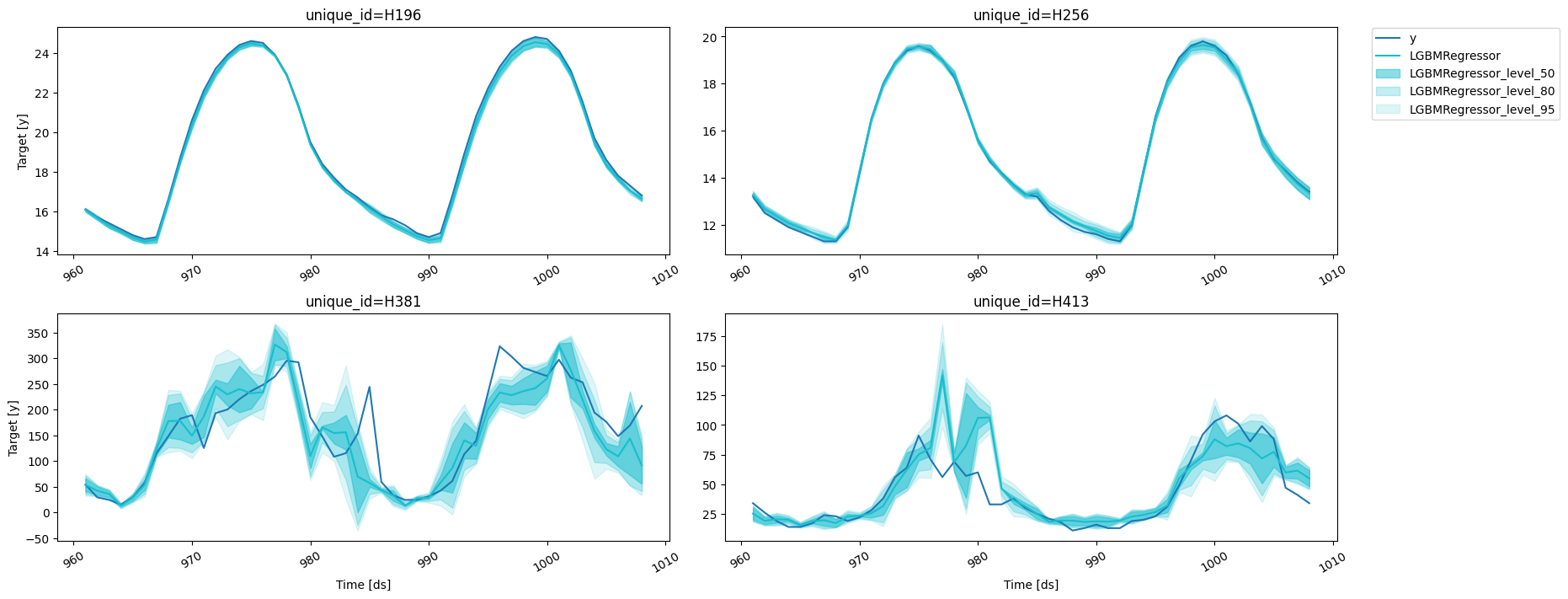
results = valid.merge(predictions_w_intervals, on=['unique_id', 'ds'])
fig = plot_series(forecasts_df=results, level=[50, 80, 95])
fig
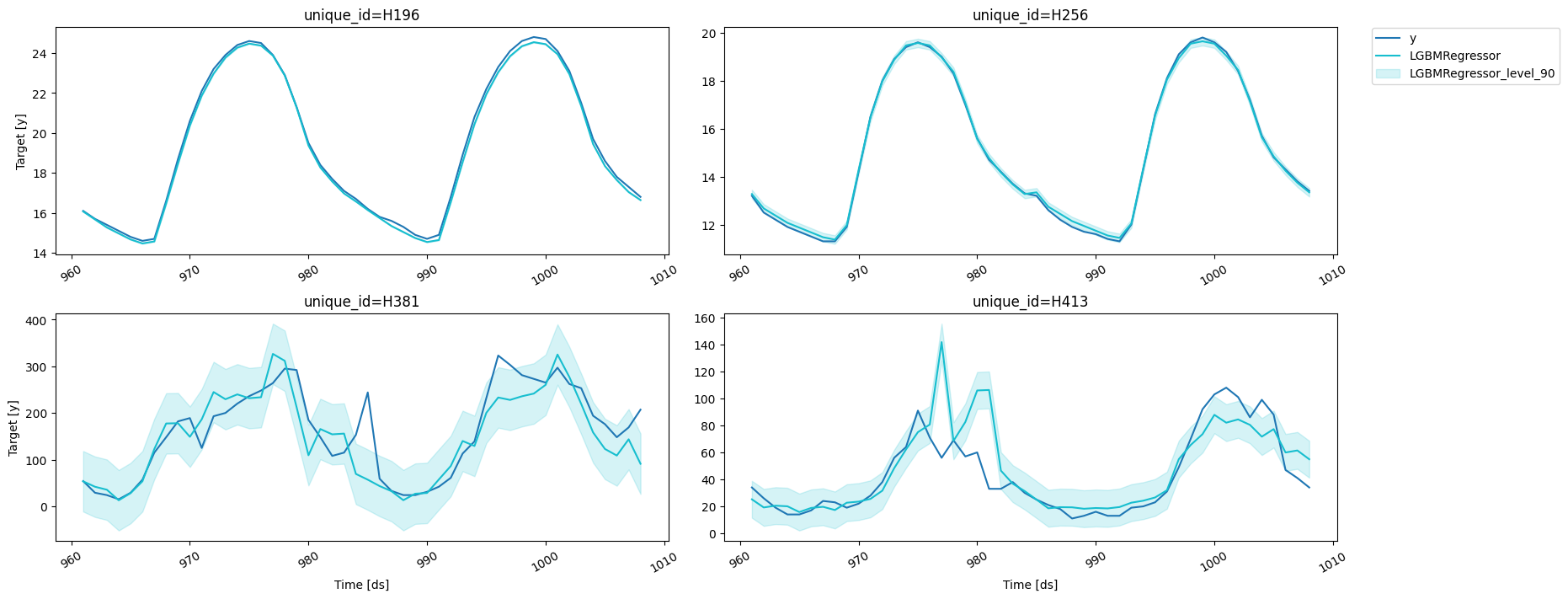
If you want to reduce the computational time and produce intervals with the same width for the whole forecast horizon, simple pass h=1 to the PredictionIntervals class. The caveat of this strategy is that in some cases, variance of the absolute residuals maybe be small (even zero), so the intervals may be too narrow.
fcst.fit(
    train,
    prediction_intervals=PredictionIntervals(n_windows=3, h=1)
);
predictions_w_intervals_ws_1 = fcst.predict(48, level=[80, 90, 95])
Let’s explore the generated intervals.
results = valid.merge(predictions_w_intervals_ws_1, on=['unique_id', 'ds'])
fig = plot_series(forecasts_df=results, level=[90])
fig

Forecast using a pretrained model

MLForecast allows you to use a pretrained model to generate forecasts for a new dataset. Simply provide a pandas dataframe containing the new observations as the value for the new_df argument when calling the predict method. The dataframe should have the same structure as the one used to fit the model, including any features and time series data. The function will then use the pretrained model to generate forecasts for the new observations. This allows you to easily apply a pretrained model to a new dataset and generate forecasts without the need to retrain the model.
ercot_df = pd.read_csv('https://datasets-nixtla.s3.amazonaws.com/ERCOT-clean.csv')

# we have to convert the ds column to integers
# since MLForecast was trained with that structure

ercot_df['ds'] = np.arange(1, len(ercot_df) + 1)
# use the `new_df` argument to pass the ercot dataset
ercot_fcsts = fcst.predict(horizon, new_df=ercot_df)
fig = plot_series(ercot_df, ercot_fcsts, max_insample_length=48 * 2)
fig

Preprocess

If you want to take a look at the data that will be used to train the models you can call Forecast.preprocess.
prep_df = fcst.preprocess(train)
prep_df
unique_iddsylag24lag48lag72lag96lag120lag144lag168exponentially_weighted_mean_lag48_alpha0.3
86988H1961930.10.00.00.00.30.10.10.30.002810
86989H1961940.1-0.10.10.00.30.10.10.30.031967
86990H1961950.1-0.10.10.00.30.10.20.10.052377
86991H1961960.10.00.00.00.30.20.10.20.036664
86992H1961970.00.00.00.10.20.20.10.20.025665
325187H4139560.010.01.06.0-53.044.0-21.021.07.963225
325188H4139579.010.010.0-7.0-46.027.0-19.024.08.574257
325189H41395816.08.05.0-9.0-36.032.0-13.08.07.501980
325190H413959-3.017.0-7.02.0-31.022.05.0-2.03.151386
325191H41396015.011.0-6.0-5.0-17.022.0-18.010.00.405970
If we do this we then have to call Forecast.fit_models, since this only stores the series information.
X, y = prep_df.drop(columns=['unique_id', 'ds', 'y']), prep_df['y']
fcst.fit_models(X, y)
MLForecast(models=[LGBMRegressor], freq=1, lag_features=['lag24', 'lag48', 'lag72', 'lag96', 'lag120', 'lag144', 'lag168', 'exponentially_weighted_mean_lag48_alpha0.3'], date_features=[], num_threads=1)
fcst
MLForecast(models=[LGBMRegressor], freq=1, lag_features=['lag24', 'lag48', 'lag72', 'lag96', 'lag120', 'lag144', 'lag168', 'exponentially_weighted_mean_lag48_alpha0.3'], date_features=[], num_threads=1)
predictions2 = fcst.predict(horizon)
pd.testing.assert_frame_equal(predictions, predictions2)
If we would like to know how good our forecast will be for a specific model and set of features then we can perform cross validation. What cross validation does is take our data and split it in two parts, where the first part is used for training and the second one for validation. Since the data is time dependant we usually take the last x observations from our data as the validation set. This process is implemented in MLForecast.cross_validation, which takes our data and performs the process described above for n_windows times where each window has h validation samples in it. For example, if we have 100 samples and we want to perform 2 backtests each of size 14, the splits will be as follows:
  1. Train: 1 to 72. Validation: 73 to 86.
  2. Train: 1 to 86. Validation: 87 to 100.
You can control the size between each cross validation window using the step_size argument. For example, if we have 100 samples and we want to perform 2 backtests each of size 14 and move one step ahead in each fold (step_size=1), the splits will be as follows:
  1. Train: 1 to 85. Validation: 86 to 99.
  2. Train: 1 to 86. Validation: 87 to 100.
You can also perform cross validation without refitting your models for each window by setting refit=False. This allows you to evaluate the performance of your models using multiple window sizes without having to retrain them each time.
fcst = MLForecast(
    models=lgb.LGBMRegressor(random_state=0, verbosity=-1),
    freq=1,
    lags=[24 * (i+1) for i in range(7)],
    lag_transforms={
        1: [RollingMean(window_size=24)],
        24: [RollingMean(window_size=24)],
        48: [ExponentiallyWeightedMean(alpha=0.3)],
    },
    num_threads=1,
    target_transforms=[Differences([24])],
)
cv_results = fcst.cross_validation(
    train,
    n_windows=2,
    h=horizon,
    step_size=horizon,
    fitted=True,
)
cv_results
unique_iddscutoffyLGBMRegressor
0H19686586415.515.373393
1H19686686415.114.973393
2H19686786414.814.673393
3H19686886414.414.373393
4H19686986414.214.073393
379H41395691259.064.284167
380H41395791258.064.830429
381H41395891253.040.726851
382H41395991238.042.739657
383H41396091246.052.802769
Since we set fitted=True we can access the predictions for the training sets as well with the cross_validation_fitted_values method.
fcst.cross_validation_fitted_values()
unique_iddsfoldyLGBMRegressor
0H196193012.712.673393
1H196194012.312.273393
2H196195011.911.873393
3H196196011.711.673393
4H196197011.411.473393
5563H413908149.050.620196
5564H413909139.035.972331
5565H413910129.029.359678
5566H413911124.025.784563
5567H413912120.023.168413
We can also compute prediction intervals by passing a configuration to prediction_intervals as well as values for the width through levels.
cv_results_intervals = fcst.cross_validation(
    train,
    n_windows=2,
    h=horizon,
    step_size=horizon,
    prediction_intervals=PredictionIntervals(h=horizon),
    level=[80, 90]
)
cv_results_intervals
unique_iddscutoffyLGBMRegressorLGBMRegressor-lo-90LGBMRegressor-lo-80LGBMRegressor-hi-80LGBMRegressor-hi-90
0H19686586415.515.37339315.31137915.31652815.43025815.435407
1H19686686415.114.97339314.94055614.94055615.00623015.006230
2H19686786414.814.67339314.60623014.60623014.74055614.740556
3H19686886414.414.37339314.30623014.30623014.44055614.440556
4H19686986414.214.07339314.00623014.00623014.14055614.140556
379H41395691259.064.28416729.89009934.37154594.19678898.678234
380H41395791258.064.83042956.87457257.82768971.83316972.786285
381H41395891253.040.72685135.29619535.84620645.60749546.157506
382H41395991238.042.73965735.29215335.80764049.67167450.187161
383H41396091246.052.80276942.46559743.89567061.70986963.139941
The refit argument allows us to control if we want to retrain the models in every window. It can either be:
  • A boolean: True will retrain on every window and False only on the first one.
  • A positive integer: The models will be trained on the first window and then every refit windows.
fcst = MLForecast(
    models=LinearRegression(),
    freq=1,
    lags=[1, 24],
)
for refit, expected_models in zip([True, False, 2], [4, 1, 2]):
    fcst.cross_validation(
        train,
        n_windows=4,
        h=horizon,
        refit=refit,
    )
assert len(fcst.cv_models_) == expected_models
fig = plot_series(forecasts_df=cv_results.drop(columns='cutoff'))
fig
fig = plot_series(forecasts_df=cv_results_intervals.drop(columns='cutoff'), level=[90])
fig

Using LightGBMCV to tune your forecasts

Once you’ve found a set of features and parameters that work for your problem you can build a forecast object from it using MLForecast.from_cv, which takes the trained LightGBMCV object and builds an MLForecast object that will use the same features and parameters. Then you can call fit and predict as you normally would.
cv = LightGBMCV(
    freq=1,
    lags=[24 * (i+1) for i in range(7)],
    lag_transforms={
        48: [ExponentiallyWeightedMean(alpha=0.3)],
    },
    num_threads=1,
    target_transforms=[Differences([24])]
)
hist = cv.fit(
    train,
    n_windows=2,
    h=horizon,
    params={'verbosity': -1},
)
[10] mape: 0.118569
[20] mape: 0.111506
[30] mape: 0.107314
[40] mape: 0.106089
[50] mape: 0.106630
Early stopping at round 50
Using best iteration: 40
fcst = MLForecast.from_cv(cv)
assert cv.best_iteration_ == fcst.models['LGBMRegressor'].n_estimators