

Tutorial on how to do multivariate forecasting using TSMixer models.In multivariate forecasting, we use the information from every time series to produce all forecasts for all time series jointly. In contrast, in univariate forecasting we only consider the information from every individual time series and produce forecasts for every time series separately. Multivariate forecasting methods thus use more information to produce every forecast, and thus should be able to provide better forecasting results. However, multivariate forecasting methods also scale with the number of time series, which means these methods are commonly less well suited for large-scale problems (i.e. forecasting many, many time series). In this notebook, we will demonstrate the performance of a state-of-the-art multivariate forecasting architecture
TSMixer /
TSMixerx when compared to a univariate forecasting method (NHITS)
and a simple MLP-based multivariate method (MLPMultivariate).
We will show how to: * Load the
ETTm2 benchmark dataset, used
in the academic literature. * Train a TSMixer, TSMixerx and
MLPMultivariate model * Forecast the test set * Optimize the
hyperparameters
You can run these experiments using GPU with Google Colab.

1. Installing libraries
2. Load ETTm2 Data
TheLongHorizon class will automatically download the complete ETTm2
dataset and process it.
It return three Dataframes: Y_df contains the values for the target
variables, X_df contains exogenous calendar features and S_df
contains static features for each time-series (none for ETTm2). For this
example we will use Y_df and X_df.
In TSMixerx, we can make use of the additional exogenous features
contained in X_df. In TSMixer, there is no support for exogenous
features. Hence, if you want to use exogenous features, you should use
TSMixerx.
If you want to use your own data just replace Y_df and X_df. Be sure
to use a long format and make sure to have a similar structure as our
data set.
| unique_id | ds | y | ex_1 | ex_2 | ex_3 | ex_4 | |
|---|---|---|---|---|---|---|---|
| 0 | HUFL | 2016-07-01 00:00:00 | -0.041413 | -0.500000 | 0.166667 | -0.500000 | -0.001370 |
| 1 | HUFL | 2016-07-01 00:15:00 | -0.185467 | -0.500000 | 0.166667 | -0.500000 | -0.001370 |
| 2 | HUFL | 2016-07-01 00:30:00 | -0.257495 | -0.500000 | 0.166667 | -0.500000 | -0.001370 |
| 3 | HUFL | 2016-07-01 00:45:00 | -0.577510 | -0.500000 | 0.166667 | -0.500000 | -0.001370 |
| 4 | HUFL | 2016-07-01 01:00:00 | -0.385501 | -0.456522 | 0.166667 | -0.500000 | -0.001370 |
| … | … | … | … | … | … | … | … |
| 403195 | OT | 2018-02-20 22:45:00 | -1.581325 | 0.456522 | -0.333333 | 0.133333 | -0.363014 |
| 403196 | OT | 2018-02-20 23:00:00 | -1.581325 | 0.500000 | -0.333333 | 0.133333 | -0.363014 |
| 403197 | OT | 2018-02-20 23:15:00 | -1.581325 | 0.500000 | -0.333333 | 0.133333 | -0.363014 |
| 403198 | OT | 2018-02-20 23:30:00 | -1.562328 | 0.500000 | -0.333333 | 0.133333 | -0.363014 |
| 403199 | OT | 2018-02-20 23:45:00 | -1.562328 | 0.500000 | -0.333333 | 0.133333 | -0.363014 |
3. Train models
We will train models using thecross_validation method, which allows
users to automatically simulate multiple historic forecasts (in the test
set).
The cross_validation method will use the validation set for
hyperparameter selection and early stopping, and will then produce the
forecasts for the test set.
First, instantiate each model in the models list, specifying the
horizon, input_size, and training iterations. In this notebook, we
compare against the univariate NHITS and multivariate
MLPMultivariate models.
Tip
Check our auto models for automatic hyperparameter optimization, and
see the end of this tutorial for an example of hyperparameter tuning.
Instantiate a NeuralForecast object with the following required
parameters:
-
models: a list of models. -
freq: a string indicating the frequency of the data. (See panda’s available frequencies.)
cross_validation method, specifying the dataset
(Y_df), validation size and test size.
cross_validation method will return the forecasts for each model
on the test set.
4. Evaluate Results
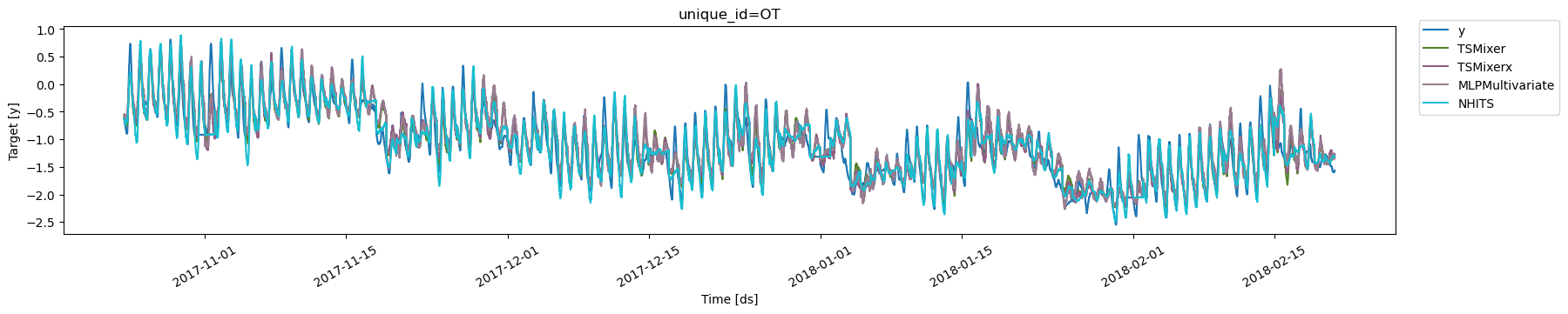
Next, we plot the forecasts on the test set for theOT variable for
all models.
| metric | TSMixer | TSMixerx | MLPMultivariate | NHITS | |
|---|---|---|---|---|---|
| 0 | mae | 0.245435 | 0.249727 | 0.263579 | 0.251008 |
| 1 | mse | 0.162566 | 0.163098 | 0.176594 | 0.178864 |
TSMixer provides
better results than the univariate method NHITS. Also, our
implementation of TSMixer very closely tracks the results of the
original paper. Finally, it seems that there is little benefit of using
the additional exogenous variables contained in the dataframe X_df as
TSMixerx performs worse than TSMixer, especially on longer horizons.
Note also that MLPMultivariate clearly underperforms as compared to
the other methods, which can be somewhat expected given its relative
simplicity.
Mean Absolute Error (MAE)
| Horizon | TSMixer (this notebook) | TSMixer (paper) | TSMixerx (this notebook) | NHITS (this notebook) | NHITS (paper) | MLPMultivariate (this notebook) |
|---|---|---|---|---|---|---|
| 96 | 0.245 | 0.252 | 0.250 | 0.251 | 0.251 | 0.263 |
| 192 | 0.288 | 0.290 | 0.300 | 0.291 | 0.305 | 0.361 |
| 336 | 0.323 | 0.324 | 0.380 | 0.344 | 0.346 | 0.390 |
| 720 | 0.377 | 0.422 | 0.464 | 0.417 | 0.413 | 0.608 |
| Horizon | TSMixer (this notebook) | TSMixer (paper) | TSMixerx (this notebook) | NHITS (this notebook) | NHITS (paper) | MLPMultivariate (this notebook) |
|---|---|---|---|---|---|---|
| 96 | 0.163 | 0.163 | 0.163 | 0.179 | 0.179 | 0.177 |
| 192 | 0.220 | 0.216 | 0.231 | 0.239 | 0.245 | 0.330 |
| 336 | 0.272 | 0.268 | 0.361 | 0.311 | 0.295 | 0.376 |
| 720 | 0.356 | 0.420 | 0.493 | 0.451 | 0.401 | 3.421 |
5. Tuning the hyperparameters
TheAutoTSMixer / AutoTSMixerx class will automatically perform
hyperparamter tunning using the Tune
library, exploring a
user-defined or default search space. Models are selected based on the
error on a validation set and the best model is then stored and used
during inference.
The AutoTSMixer.default_config / AutoTSMixerx.default_config
attribute contains a suggested hyperparameter space. Here, we specify a
different search space following the paper’s hyperparameters. Feel free
to play around with this space.
For this example, we will optimize the hyperparameters for
horizon = 96.
AutoTSMixer and AutoTSMixerx you need to define:
h: forecasting horizonn_series: number of time series in the multivariate time series problem.
AutoTSMixer/AutoTSMixerx class will use a pre-defined value): *
loss: training loss. Use the DistributionLoss to produce
probabilistic forecasts. * config: hyperparameter search space. If
None, the AutoTSMixer class will use a pre-defined suggested
hyperparameter space. * num_samples: number of configurations
explored. For this example, we only use a limited amount of 10. *
search_alg: type of search algorithm used for selecting parameter
values within the hyperparameter space. * backend: the backend used
for the hyperparameter optimization search, either ray or optuna. *
valid_loss: the loss used for the validation sets in the optimization
procedure.
NeuralForecast object with
the following required parameters:
-
models: a list of models. -
freq: a string indicating the frequency of the data. (See panda’s available frequencies.)
cross_validation method allows you to simulate multiple historic
forecasts, greatly simplifying pipelines by replacing for loops with
fit and predict methods.
With time series data, cross validation is done by defining a sliding
window across the historical data and predicting the period following
it. This form of cross validation allows us to arrive at a better
estimation of our model’s predictive abilities across a wider range of
temporal instances while also keeping the data in the training set
contiguous as is required by our models.
The cross_validation method will use the validation set for
hyperparameter selection, and will then produce the forecasts for the
test set.
6. Evaluate Results
TheAutoTSMixer/AutoTSMixerx class contains a results attribute
that stores information of each configuration explored. It contains the
validation loss and best validation hyperparameter. The result dataframe
Y_hat_df that we obtained in the previous step is based on the best
config of the hyperparameter search. For AutoTSMixer, the best config
is:
AutoTSMixerx:
| metric | AutoTSMixer | AutoTSMixerx | |
|---|---|---|---|
| 0 | mae | 0.243749 | 0.251972 |
| 1 | mse | 0.162212 | 0.164347 |
TSMixer on MAE. Interestingly, we did not improve for TSMixerx as
compared to the default settings. For this dataset, it seems there is
limited value in using exogenous features with the TSMixerx
architecture for a horizon of 96.
| Metric | TSMixer (optimized) | TSMixer (default) | TSMixer (paper) | TSMixerx (optimized) | TSMixerx (default) |
|---|---|---|---|---|---|
| MAE | 0.244 | 0.245 | 0.252 | 0.252 | 0.250 |
| MSE | 0.162 | 0.163 | 0.163 | 0.164 | 0.163 |
num_samples=10), which may suggest that it is possible to further
improve forecasting performance by exploring more hyperparameter
configurations.
References
Chen, Si-An, Chun-Liang Li, Nate Yoder, Sercan O. Arik, and Tomas Pfister (2023). “TSMixer: An All-MLP Architecture for Time Series Forecasting.”Cristian Challu, Kin G. Olivares, Boris N. Oreshkin, Federico Garza, Max Mergenthaler-Canseco, Artur Dubrawski (2021). NHITS: Neural Hierarchical Interpolation for Time Series Forecasting. Accepted at AAAI 2023.