

Learn how to select the best forecasting models when you care about more than one metric — without manually ranking and comparing every combination.
What you’ll learn
- Why single-metric model selection can be misleading
- What Pareto dominance means and when a model is “dominated”
- How to use
evaluate()correctly as input toParetoFrontier - How to visualize the 2D Pareto frontier across any two metrics
- How to handle cross-validation output for multi-objective selection
The problem: picking one winner across multiple metrics
After training several forecasting models, a common question is: which one should I deploy? If you optimize for a single metric — say MAE — the answer is straightforward: pick the lowest MAE. But real-world requirements rarely reduce to a single number. You might care about:- Accuracy (MAE, RMSE): how close are point forecasts to actuals?
- Relative error (MAPE, sMAPE): how large is the error relative to the scale of the series?
- Bias (bias, CFE): does the model systematically over- or under-forecast?
Install libraries
Generate synthetic time series
We usegenerate_series to create a panel of daily time series with
weekly seasonality. Each series contains between 100 and 150
observations, giving models enough history for a meaningful fit.
We hold out the last 14 days of each series as the evaluation window and
use the rest for training.
Fit models and generate forecasts
We compare three models that cover a range of complexity:- SeasonalNaive — repeats the last observed season. Fast, transparent, surprisingly hard to beat.
- AutoARIMA — fits a SARIMA model selected automatically by AIC. More flexible but slower.
- MSTL — decomposes the series into trend and seasonal components using STL, then forecasts each part separately. Good at capturing multiple seasonal patterns.
Merge predictions with the held-out actuals to get a single DataFrame
ready for
evaluate().
Evaluate models across multiple metrics
evaluate() computes any combination of loss functions from
utilsforecast.losses and returns a tidy DataFrame with one row per
(unique_id, metric) and one column per model.
For Pareto analysis we need one scalar per metric per model — a
single number that summarises performance across all series. The
agg_fn='mean' argument collapses the per-series rows into a single
mean, giving a (n_metrics, n_models) table.
At a glance, no single model wins on every metric. MSTL tends to have
lower absolute errors while SeasonalNaive can be competitive on relative
metrics for series with strong weekly patterns. This is exactly the
situation where Pareto analysis adds value.
Find the Pareto frontier
ParetoFrontier.find_non_dominated() takes the aggregated scores table
and returns only the columns corresponding to non-dominated models —
dropping any model for which another model is at least as good on every
metric and strictly better on at least one.
The models that survive are the Pareto-optimal set. Dropping the
rest is safe: for every eliminated model, there is at least one
surviving model that dominates it across every metric simultaneously.
Focusing on a subset of metrics
You can restrict the comparison to only the metrics that matter for your use case by passing ametrics list.
Maximization metrics
By default all metrics are minimized (lower is better). If a metric should be maximized — for example, a custom R² score — pass its name inmaximization.
Visualize the 2D Pareto frontier
When comparing two metrics,ParetoFrontier.plot_pareto_2d() renders a
scatter plot where dominated models appear in grey and Pareto-optimal
models appear in red, connected by a dashed frontier line.
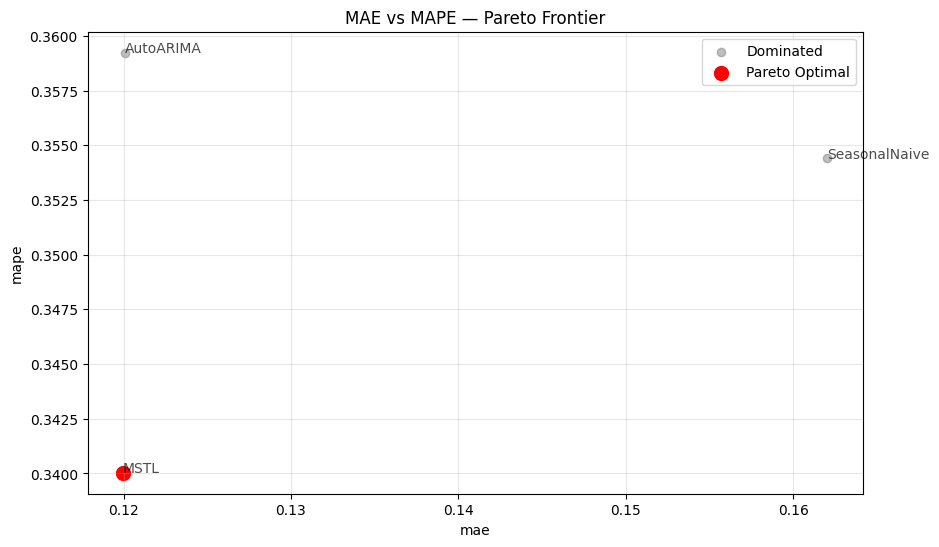
maximize_x and maximize_y flags for metrics where
larger is better, and show_dominated=False to declutter the chart when
many models are present.
Cross-validation: multi-window model selection
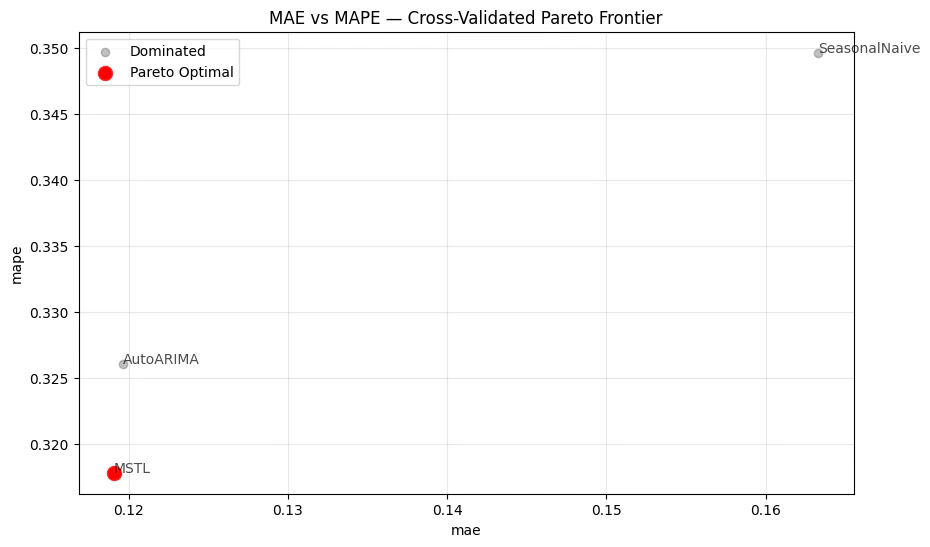
A single held-out window can be noisy. StatsForecast’scross_validation() produces estimates across multiple windows, giving
a more robust picture of model performance.
The cross-validation output has a cutoff column — evaluate() keeps
it, so agg_fn='mean' aggregates across series within each cutoff,
not across all windows at once. To collapse everything into a single row
per metric for Pareto analysis, apply a second groupby.
Custom column names
If your pipeline uses column names different from the defaults (unique_id, cutoff), pass id_col and cutoff_col to both
evaluate() and find_non_dominated() so the Pareto analysis correctly
identifies which columns are model predictions.
Key takeaways
- Single-metric selection discards information. When metrics disagree, there is no universally correct answer — only trade-offs worth making explicit.
- Pareto dominance is a lossless filter. Every eliminated model is objectively outperformed; no information about the surviving frontier is lost.
- Always aggregate before calling
find_non_dominated(). Passagg_fn='mean'toevaluate()so the input has exactly one row per metric. For cross-validation output, apply a second groupby over themetriccolumn to collapse across cutoffs as well. plot_pareto_2d()makes the trade-off tangible. Pick any two metrics on the axes to see which models sit on the frontier and which ones are dominated.- Custom column names are supported. Pass
id_colandcutoff_colconsistently acrossevaluate()andfind_non_dominated()when your data uses non-default names.