> ## Documentation Index
> Fetch the complete documentation index at: https://nixtlaverse.nixtla.io/llms.txt
> Use this file to discover all available pages before exploring further.
# Quickstart
> Fit an LSTM and NHITS model
This notebook provides an example on how to start using the main
functionalities of the NeuralForecast library. The `NeuralForecast`
class allows users to easily interact with `NeuralForecast.models`
PyTorch models. In this example we will forecast AirPassengers data with
a classic `LSTM` and the recent `NHITS` models. The full list of
available models is available [here](../capabilities/overview.html).
You can run these experiments using GPU with Google Colab.
 ## 1. Installing NeuralForecast
```python theme={null}
%%capture
!pip install neuralforecast
```
## 2. Loading AirPassengers Data
The `core.NeuralForecast` class contains shared, `fit`, `predict` and
other methods that take as inputs pandas DataFrames with columns
`['unique_id', 'ds', 'y']`, where `unique_id` identifies individual time
series from the dataset, `ds` is the date, and `y` is the target
variable.
In this example dataset consists of a set of a single series, but you
can easily fit your model to larger datasets in long format.
```python theme={null}
from neuralforecast.utils import AirPassengersDF
```
```python theme={null}
Y_df = AirPassengersDF
Y_df.head()
```
| | unique\_id | ds | y |
| - | ---------- | ---------- | ----- |
| 0 | 1.0 | 1949-01-31 | 112.0 |
| 1 | 1.0 | 1949-02-28 | 118.0 |
| 2 | 1.0 | 1949-03-31 | 132.0 |
| 3 | 1.0 | 1949-04-30 | 129.0 |
| 4 | 1.0 | 1949-05-31 | 121.0 |
> **Important**
>
> DataFrames must include all `['unique_id', 'ds', 'y']` columns. Make
> sure `y` column does not have missing or non-numeric values.
## 3. Model Training
### Fit the models
Using the `NeuralForecast.fit` method you can train a set of models to
your dataset. You can define the forecasting `horizon` (12 in this
example), and modify the hyperparameters of the model. For example, for
the `LSTM` we changed the default hidden size for both encoder and
decoders.
```python theme={null}
import logging
from neuralforecast import NeuralForecast
from neuralforecast.models import LSTM, NHITS, RNN
```
```python theme={null}
logging.getLogger('pytorch_lightning').setLevel(logging.ERROR)
```
```python theme={null}
%%capture
horizon = 12
# Try different hyperparmeters to improve accuracy.
models = [LSTM(input_size=2 * horizon,
h=horizon, # Forecast horizon
max_steps=500, # Number of steps to train
scaler_type='standard', # Type of scaler to normalize data
encoder_hidden_size=64, # Defines the size of the hidden state of the LSTM
decoder_hidden_size=64,), # Defines the number of hidden units of each layer of the MLP decoder
NHITS(h=horizon, # Forecast horizon
input_size=2 * horizon, # Length of input sequence
max_steps=100, # Number of steps to train
n_freq_downsample=[2, 1, 1]) # Downsampling factors for each stack output
]
nf = NeuralForecast(models=models, freq='ME')
nf.fit(df=Y_df)
```
> **Tip**
>
> The performance of Deep Learning models can be very sensitive to the
> choice of hyperparameters. Tuning the correct hyperparameters is an
> important step to obtain the best forecasts. The `Auto` version of
> these models, `AutoLSTM` and `AutoNHITS`, already perform
> hyperparameter selection automatically.
### Predict using the fitted models
Using the `NeuralForecast.predict` method you can obtain the `h`
forecasts after the training data `Y_df`.
```python theme={null}
Y_hat_df = nf.predict()
```
The `NeuralForecast.predict` method returns a DataFrame with the
forecasts for each `unique_id`, `ds`, and model.
```python theme={null}
Y_hat_df = Y_hat_df
Y_hat_df.head()
```
| | unique\_id | ds | LSTM | NHITS |
| - | ---------- | ---------- | ---------- | ---------- |
| 0 | 1.0 | 1961-01-31 | 445.602112 | 447.531281 |
| 1 | 1.0 | 1961-02-28 | 431.253510 | 439.081024 |
| 2 | 1.0 | 1961-03-31 | 456.301270 | 481.924194 |
| 3 | 1.0 | 1961-04-30 | 508.149750 | 501.501343 |
| 4 | 1.0 | 1961-05-31 | 524.903870 | 514.664551 |
## 4. Plot Predictions
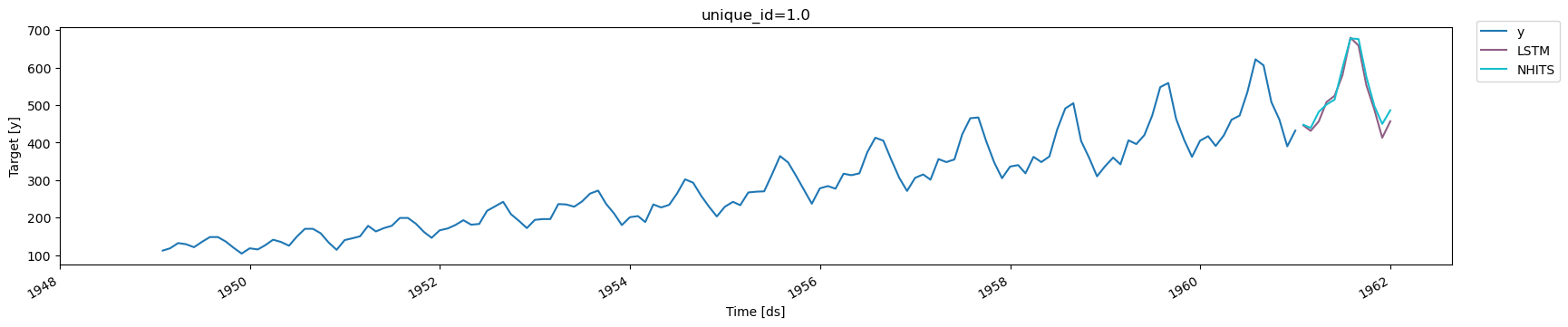
Finally, we plot the forecasts of both models against the real values.
```python theme={null}
from utilsforecast.plotting import plot_series
```
```python theme={null}
plot_series(Y_df, Y_hat_df)
```
## 1. Installing NeuralForecast
```python theme={null}
%%capture
!pip install neuralforecast
```
## 2. Loading AirPassengers Data
The `core.NeuralForecast` class contains shared, `fit`, `predict` and
other methods that take as inputs pandas DataFrames with columns
`['unique_id', 'ds', 'y']`, where `unique_id` identifies individual time
series from the dataset, `ds` is the date, and `y` is the target
variable.
In this example dataset consists of a set of a single series, but you
can easily fit your model to larger datasets in long format.
```python theme={null}
from neuralforecast.utils import AirPassengersDF
```
```python theme={null}
Y_df = AirPassengersDF
Y_df.head()
```
| | unique\_id | ds | y |
| - | ---------- | ---------- | ----- |
| 0 | 1.0 | 1949-01-31 | 112.0 |
| 1 | 1.0 | 1949-02-28 | 118.0 |
| 2 | 1.0 | 1949-03-31 | 132.0 |
| 3 | 1.0 | 1949-04-30 | 129.0 |
| 4 | 1.0 | 1949-05-31 | 121.0 |
> **Important**
>
> DataFrames must include all `['unique_id', 'ds', 'y']` columns. Make
> sure `y` column does not have missing or non-numeric values.
## 3. Model Training
### Fit the models
Using the `NeuralForecast.fit` method you can train a set of models to
your dataset. You can define the forecasting `horizon` (12 in this
example), and modify the hyperparameters of the model. For example, for
the `LSTM` we changed the default hidden size for both encoder and
decoders.
```python theme={null}
import logging
from neuralforecast import NeuralForecast
from neuralforecast.models import LSTM, NHITS, RNN
```
```python theme={null}
logging.getLogger('pytorch_lightning').setLevel(logging.ERROR)
```
```python theme={null}
%%capture
horizon = 12
# Try different hyperparmeters to improve accuracy.
models = [LSTM(input_size=2 * horizon,
h=horizon, # Forecast horizon
max_steps=500, # Number of steps to train
scaler_type='standard', # Type of scaler to normalize data
encoder_hidden_size=64, # Defines the size of the hidden state of the LSTM
decoder_hidden_size=64,), # Defines the number of hidden units of each layer of the MLP decoder
NHITS(h=horizon, # Forecast horizon
input_size=2 * horizon, # Length of input sequence
max_steps=100, # Number of steps to train
n_freq_downsample=[2, 1, 1]) # Downsampling factors for each stack output
]
nf = NeuralForecast(models=models, freq='ME')
nf.fit(df=Y_df)
```
> **Tip**
>
> The performance of Deep Learning models can be very sensitive to the
> choice of hyperparameters. Tuning the correct hyperparameters is an
> important step to obtain the best forecasts. The `Auto` version of
> these models, `AutoLSTM` and `AutoNHITS`, already perform
> hyperparameter selection automatically.
### Predict using the fitted models
Using the `NeuralForecast.predict` method you can obtain the `h`
forecasts after the training data `Y_df`.
```python theme={null}
Y_hat_df = nf.predict()
```
The `NeuralForecast.predict` method returns a DataFrame with the
forecasts for each `unique_id`, `ds`, and model.
```python theme={null}
Y_hat_df = Y_hat_df
Y_hat_df.head()
```
| | unique\_id | ds | LSTM | NHITS |
| - | ---------- | ---------- | ---------- | ---------- |
| 0 | 1.0 | 1961-01-31 | 445.602112 | 447.531281 |
| 1 | 1.0 | 1961-02-28 | 431.253510 | 439.081024 |
| 2 | 1.0 | 1961-03-31 | 456.301270 | 481.924194 |
| 3 | 1.0 | 1961-04-30 | 508.149750 | 501.501343 |
| 4 | 1.0 | 1961-05-31 | 524.903870 | 514.664551 |
## 4. Plot Predictions
Finally, we plot the forecasts of both models against the real values.
```python theme={null}
from utilsforecast.plotting import plot_series
```
```python theme={null}
plot_series(Y_df, Y_hat_df)
```
 > **Tip**
>
> For this guide we are using a simple `LSTM` model. More recent models,
> such as `TSMixer`, `TFT` and `NHITS` achieve better accuracy than
> `LSTM` in most settings. The full list of available models is
> available [here](../capabilities/overview.html).
## References
* [Boris N. Oreshkin, Dmitri Carpov, Nicolas Chapados, Yoshua Bengio
(2020). “N-BEATS: Neural basis expansion analysis for interpretable
time series forecasting”. International Conference on Learning
Representations.](https://arxiv.org/abs/1905.10437)
> **Tip**
>
> For this guide we are using a simple `LSTM` model. More recent models,
> such as `TSMixer`, `TFT` and `NHITS` achieve better accuracy than
> `LSTM` in most settings. The full list of available models is
> available [here](../capabilities/overview.html).
## References
* [Boris N. Oreshkin, Dmitri Carpov, Nicolas Chapados, Yoshua Bengio
(2020). “N-BEATS: Neural basis expansion analysis for interpretable
time series forecasting”. International Conference on Learning
Representations.](https://arxiv.org/abs/1905.10437)
* [Cristian Challu, Kin G. Olivares, Boris N. Oreshkin, Federico
Garza, Max Mergenthaler-Canseco, Artur Dubrawski (2021). NHITS:
Neural Hierarchical Interpolation for Time Series Forecasting.
Accepted at AAAI 2023.](https://arxiv.org/abs/2201.12886)