> ## Documentation Index
> Fetch the complete documentation index at: https://nixtlaverse.nixtla.io/llms.txt
> Use this file to discover all available pages before exploring further.
# Save and Load Models
Saving and loading trained Deep Learning models has multiple valuable
uses. These models are often costly to train; storing a pre-trained
model can help reduce costs as it can be loaded and reused to forecast
multiple times. Moreover, it enables Transfer learning capabilities,
consisting of pre-training a flexible model on a large dataset and using
it later on other data with little to no training. It is one of the most
outstanding 🚀 achievements in Machine Learning 🧠 and has many
practical applications.
In this notebook we show an example on how to save and load
`NeuralForecast` models.
The two methods to consider are:
1. `NeuralForecast.save`: Saves
models into disk, allows save dataset and config.
2.
`NeuralForecast.load`: Loads models from a given path.
> **Important**
>
> This Guide assumes basic knowledge on the NeuralForecast library. For
> a minimal example visit the [Getting
> Started](../getting-started/quickstart.html) guide.
You can run these experiments using GPU with Google Colab.
 ## 1. Installing NeuralForecast
```python theme={null}
%%capture
!pip install neuralforecast
```
## 2. Loading AirPassengers Data
For this example we will use the classical [AirPassenger Data
set](https://www.kaggle.com/datasets/rakannimer/air-passengers). Import
the pre-processed AirPassenger from `utils`.
```python theme={null}
from neuralforecast.utils import AirPassengersDF
```
```python theme={null}
Y_df = AirPassengersDF
Y_df.head()
```
| | unique\_id | ds | y |
| - | ---------- | ---------- | ----- |
| 0 | 1.0 | 1949-01-31 | 112.0 |
| 1 | 1.0 | 1949-02-28 | 118.0 |
| 2 | 1.0 | 1949-03-31 | 132.0 |
| 3 | 1.0 | 1949-04-30 | 129.0 |
| 4 | 1.0 | 1949-05-31 | 121.0 |
## 3. Model Training
Next, we instantiate and train three models: `NBEATS`, `NHITS`, and
`AutoMLP`. The models with their hyperparameters are defined in the
`models` list.
```python theme={null}
import logging
from ray import tune
from neuralforecast.core import NeuralForecast
from neuralforecast.auto import AutoMLP
from neuralforecast.models import NBEATS, NHITS
```
```python theme={null}
logging.getLogger('pytorch_lightning').setLevel(logging.ERROR)
```
```python theme={null}
horizon = 12
models = [NBEATS(input_size=2 * horizon, h=horizon, max_steps=50),
NHITS(input_size=2 * horizon, h=horizon, max_steps=50),
AutoMLP(# Ray tune explore config
config=dict(max_steps=100, # Operates with steps not epochs
input_size=tune.choice([3*horizon]),
learning_rate=tune.choice([1e-3])),
h=horizon,
num_samples=1, cpus=1)]
```
```text theme={null}
Seed set to 1
Seed set to 1
```
```python theme={null}
%%capture
nf = NeuralForecast(models=models, freq='ME')
nf.fit(df=Y_df)
```
Produce the forecasts with the `predict` method.
```python theme={null}
Y_hat_df = nf.predict()
Y_hat_df.head()
```
```text theme={null}
Predicting: | …
```
```text theme={null}
Predicting: | …
```
```text theme={null}
Predicting: | …
```
| | unique\_id | ds | NBEATS | NHITS | AutoMLP |
| - | ---------- | ---------- | ---------- | ---------- | ---------- |
| 0 | 1.0 | 1961-01-31 | 446.882172 | 447.219238 | 454.914154 |
| 1 | 1.0 | 1961-02-28 | 465.145813 | 464.558014 | 430.188446 |
| 2 | 1.0 | 1961-03-31 | 469.978424 | 474.637238 | 458.478577 |
| 3 | 1.0 | 1961-04-30 | 493.650665 | 502.670349 | 477.244507 |
| 4 | 1.0 | 1961-05-31 | 537.569275 | 559.405212 | 522.252991 |
We plot the forecasts for each model.
```python theme={null}
from utilsforecast.plotting import plot_series
```
```python theme={null}
plot_series(Y_df, Y_hat_df)
```
## 1. Installing NeuralForecast
```python theme={null}
%%capture
!pip install neuralforecast
```
## 2. Loading AirPassengers Data
For this example we will use the classical [AirPassenger Data
set](https://www.kaggle.com/datasets/rakannimer/air-passengers). Import
the pre-processed AirPassenger from `utils`.
```python theme={null}
from neuralforecast.utils import AirPassengersDF
```
```python theme={null}
Y_df = AirPassengersDF
Y_df.head()
```
| | unique\_id | ds | y |
| - | ---------- | ---------- | ----- |
| 0 | 1.0 | 1949-01-31 | 112.0 |
| 1 | 1.0 | 1949-02-28 | 118.0 |
| 2 | 1.0 | 1949-03-31 | 132.0 |
| 3 | 1.0 | 1949-04-30 | 129.0 |
| 4 | 1.0 | 1949-05-31 | 121.0 |
## 3. Model Training
Next, we instantiate and train three models: `NBEATS`, `NHITS`, and
`AutoMLP`. The models with their hyperparameters are defined in the
`models` list.
```python theme={null}
import logging
from ray import tune
from neuralforecast.core import NeuralForecast
from neuralforecast.auto import AutoMLP
from neuralforecast.models import NBEATS, NHITS
```
```python theme={null}
logging.getLogger('pytorch_lightning').setLevel(logging.ERROR)
```
```python theme={null}
horizon = 12
models = [NBEATS(input_size=2 * horizon, h=horizon, max_steps=50),
NHITS(input_size=2 * horizon, h=horizon, max_steps=50),
AutoMLP(# Ray tune explore config
config=dict(max_steps=100, # Operates with steps not epochs
input_size=tune.choice([3*horizon]),
learning_rate=tune.choice([1e-3])),
h=horizon,
num_samples=1, cpus=1)]
```
```text theme={null}
Seed set to 1
Seed set to 1
```
```python theme={null}
%%capture
nf = NeuralForecast(models=models, freq='ME')
nf.fit(df=Y_df)
```
Produce the forecasts with the `predict` method.
```python theme={null}
Y_hat_df = nf.predict()
Y_hat_df.head()
```
```text theme={null}
Predicting: | …
```
```text theme={null}
Predicting: | …
```
```text theme={null}
Predicting: | …
```
| | unique\_id | ds | NBEATS | NHITS | AutoMLP |
| - | ---------- | ---------- | ---------- | ---------- | ---------- |
| 0 | 1.0 | 1961-01-31 | 446.882172 | 447.219238 | 454.914154 |
| 1 | 1.0 | 1961-02-28 | 465.145813 | 464.558014 | 430.188446 |
| 2 | 1.0 | 1961-03-31 | 469.978424 | 474.637238 | 458.478577 |
| 3 | 1.0 | 1961-04-30 | 493.650665 | 502.670349 | 477.244507 |
| 4 | 1.0 | 1961-05-31 | 537.569275 | 559.405212 | 522.252991 |
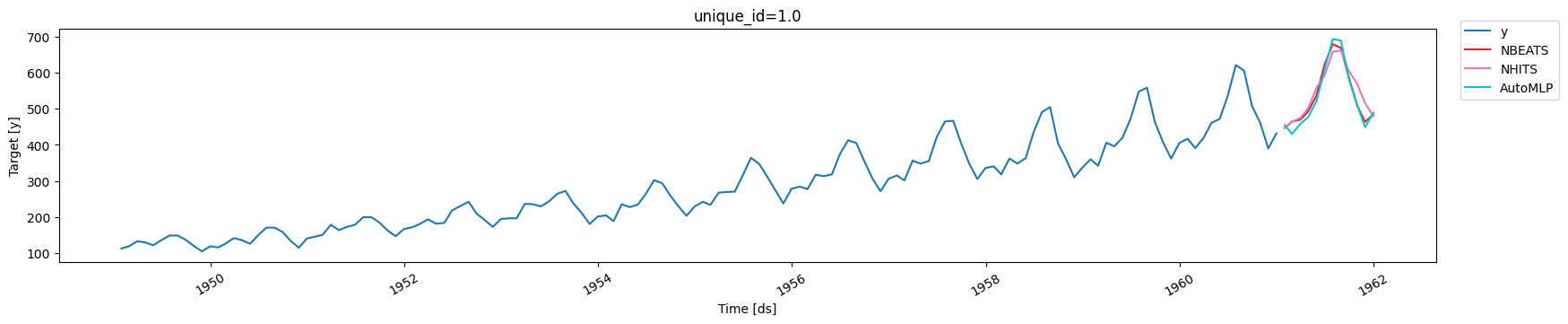
We plot the forecasts for each model.
```python theme={null}
from utilsforecast.plotting import plot_series
```
```python theme={null}
plot_series(Y_df, Y_hat_df)
```
 ## 4. Save models
To save all the trained models use the `save` method. This method will
save both the hyperparameters and the learnable weights (parameters).
The `save` method has the following inputs:
* `path`: directory where models will be saved.
* `model_index`: optional list to specify which models to save. For
example, to only save the `NHITS` model use `model_index=[2]`.
* `overwrite`: boolean to overwrite existing files in `path`. When
True, the method will only overwrite models with conflicting names.
* `save_dataset`: boolean to save `Dataset` object with the dataset.
```python theme={null}
nf.save(path='./checkpoints/test_run/',
model_index=None,
overwrite=True,
save_dataset=True)
```
For each model, two files are created and stored:
* `[model_name]_[suffix].ckpt`: Pytorch Lightning checkpoint file with
the model parameters and hyperparameters.
* `[model_name]_[suffix].pkl`: Dictionary with configuration
attributes.
Where `model_name` corresponds to the name of the model in lowercase
(eg. `nhits`). We use a numerical suffix to distinguish multiple models
of each class. In this example the names will be `automlp_0`,
`nbeats_0`, and `nhits_0`.
> **Important**
>
> The `Auto` models will be stored as their base model. For example, the
> `AutoMLP` trained above is stored as an `MLP` model, with the best
> hyparparameters found during tuning.
## 5. Load models
Load the saved models with the `load` method, specifying the `path`, and
use the new `nf2` object to produce forecasts.
```python theme={null}
nf2 = NeuralForecast.load(path='./checkpoints/test_run/')
Y_hat_df2 = nf2.predict()
Y_hat_df2.head()
```
```text theme={null}
Seed set to 1
Seed set to 1
Seed set to 1
```
```text theme={null}
Predicting: | …
```
```text theme={null}
Predicting: | …
```
```text theme={null}
Predicting: | …
```
| | unique\_id | ds | NHITS | NBEATS | AutoMLP |
| - | ---------- | ---------- | ---------- | ---------- | ---------- |
| 0 | 1.0 | 1961-01-31 | 447.219238 | 446.882172 | 454.914154 |
| 1 | 1.0 | 1961-02-28 | 464.558014 | 465.145813 | 430.188446 |
| 2 | 1.0 | 1961-03-31 | 474.637238 | 469.978424 | 458.478577 |
| 3 | 1.0 | 1961-04-30 | 502.670349 | 493.650665 | 477.244507 |
| 4 | 1.0 | 1961-05-31 | 559.405212 | 537.569275 | 522.252991 |
Finally, plot the forecasts to confirm they are identical to the
original forecasts.
```python theme={null}
plot_series(Y_df, Y_hat_df2)
```
## 4. Save models
To save all the trained models use the `save` method. This method will
save both the hyperparameters and the learnable weights (parameters).
The `save` method has the following inputs:
* `path`: directory where models will be saved.
* `model_index`: optional list to specify which models to save. For
example, to only save the `NHITS` model use `model_index=[2]`.
* `overwrite`: boolean to overwrite existing files in `path`. When
True, the method will only overwrite models with conflicting names.
* `save_dataset`: boolean to save `Dataset` object with the dataset.
```python theme={null}
nf.save(path='./checkpoints/test_run/',
model_index=None,
overwrite=True,
save_dataset=True)
```
For each model, two files are created and stored:
* `[model_name]_[suffix].ckpt`: Pytorch Lightning checkpoint file with
the model parameters and hyperparameters.
* `[model_name]_[suffix].pkl`: Dictionary with configuration
attributes.
Where `model_name` corresponds to the name of the model in lowercase
(eg. `nhits`). We use a numerical suffix to distinguish multiple models
of each class. In this example the names will be `automlp_0`,
`nbeats_0`, and `nhits_0`.
> **Important**
>
> The `Auto` models will be stored as their base model. For example, the
> `AutoMLP` trained above is stored as an `MLP` model, with the best
> hyparparameters found during tuning.
## 5. Load models
Load the saved models with the `load` method, specifying the `path`, and
use the new `nf2` object to produce forecasts.
```python theme={null}
nf2 = NeuralForecast.load(path='./checkpoints/test_run/')
Y_hat_df2 = nf2.predict()
Y_hat_df2.head()
```
```text theme={null}
Seed set to 1
Seed set to 1
Seed set to 1
```
```text theme={null}
Predicting: | …
```
```text theme={null}
Predicting: | …
```
```text theme={null}
Predicting: | …
```
| | unique\_id | ds | NHITS | NBEATS | AutoMLP |
| - | ---------- | ---------- | ---------- | ---------- | ---------- |
| 0 | 1.0 | 1961-01-31 | 447.219238 | 446.882172 | 454.914154 |
| 1 | 1.0 | 1961-02-28 | 464.558014 | 465.145813 | 430.188446 |
| 2 | 1.0 | 1961-03-31 | 474.637238 | 469.978424 | 458.478577 |
| 3 | 1.0 | 1961-04-30 | 502.670349 | 493.650665 | 477.244507 |
| 4 | 1.0 | 1961-05-31 | 559.405212 | 537.569275 | 522.252991 |
Finally, plot the forecasts to confirm they are identical to the
original forecasts.
```python theme={null}
plot_series(Y_df, Y_hat_df2)
```
 ## References
[https://pytorch-lightning.readthedocs.io/en/stable/common/checkpointing\_basic.html](https://pytorch-lightning.readthedocs.io/en/stable/common/checkpointing_basic.html)
[Oreshkin, B. N., Carpov, D., Chapados, N., & Bengio, Y. (2019).
N-BEATS: Neural basis expansion analysis for interpretable time series
forecasting. ICLR 2020](https://arxiv.org/abs/1905.10437)
[Cristian Challu, Kin G. Olivares, Boris N. Oreshkin, Federico Garza,
Max Mergenthaler-Canseco, Artur Dubrawski (2021). N-HiTS: Neural
Hierarchical Interpolation for Time Series Forecasting. Accepted at AAAI
2023.](https://arxiv.org/abs/2201.12886)
## References
[https://pytorch-lightning.readthedocs.io/en/stable/common/checkpointing\_basic.html](https://pytorch-lightning.readthedocs.io/en/stable/common/checkpointing_basic.html)
[Oreshkin, B. N., Carpov, D., Chapados, N., & Bengio, Y. (2019).
N-BEATS: Neural basis expansion analysis for interpretable time series
forecasting. ICLR 2020](https://arxiv.org/abs/1905.10437)
[Cristian Challu, Kin G. Olivares, Boris N. Oreshkin, Federico Garza,
Max Mergenthaler-Canseco, Artur Dubrawski (2021). N-HiTS: Neural
Hierarchical Interpolation for Time Series Forecasting. Accepted at AAAI
2023.](https://arxiv.org/abs/2201.12886)